







Modern vehicles offer more entertainment, navigation, and communication functions than ever before. However, using these functions while driving can sometimes be inconvenient. Reaching for a dashboard screen or looking down to adjust the radio can take a driver's attention away from the road, even if only for a short time.
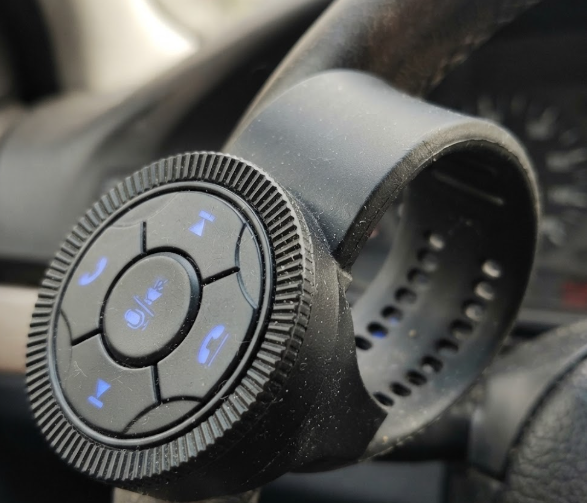
A 668 Universal Multi-Function Steering Wheel Remote Control provides a simple way to bring more controls directly to the steering wheel. Instead of reaching toward the center console, drivers can use buttons positioned close to their hands to manage common audio and communication functions.
For vehicles with aftermarket Android screens or compatible factory audio systems, this type of upgrade can make the cabin easier and more convenient to use.
668 Universal Multi-Function Steering Wheel Remote Control
Why Steering Wheel Controls Are Useful
The main advantage of a steering wheel controller is convenience.
Drivers may need to change the volume, switch songs, change audio modes, or answer a phone call while driving. Without steering wheel controls, these operations often require reaching toward the dashboard or center console.
A universal steering wheel remote control places these commonly used functions within easy reach. The driver can keep both hands closer to the steering wheel while making basic adjustments.
This is particularly useful for vehicles that did not originally come with steering wheel multimedia controls or for cars that have been upgraded with an aftermarket head unit.
Universal Design for Different Vehicles
One of the biggest challenges with aftermarket automotive accessories is compatibility. Different vehicle models can have different steering wheel shapes, available installation space, and head-unit control systems.
The 668 steering wheel remote control is designed as a universal solution that can be installed on different steering wheel configurations. Its compact design allows the controller to be positioned where the driver's thumb can reach the buttons comfortably.
The button layout is also designed for frequently used functions, allowing drivers to operate common controls without constantly looking down at the dashboard.
Connecting the Controller to the Head Unit
A steering wheel controller needs to communicate correctly with the vehicle's audio or multimedia system.
The 668 system can use wireless communication together with a receiver installed behind the dashboard or close to the head unit. Depending on the vehicle and head-unit configuration, connections can include steering wheel control inputs such as KEY1 and KEY2.
It can work with compatible aftermarket Android or Windows CE head units and certain factory stereos that support steering wheel control inputs.
Before installation, buyers should confirm the head-unit interface and wiring requirements to make sure the controller is compatible with the vehicle.
Functions Available on the 668 Remote
The 668 Universal Multi-Function Steering Wheel Remote Control is designed to handle several common multimedia functions from the steering wheel.
Depending on the system configuration, the buttons can be assigned to functions such as:
- Volume up and volume down
- Previous and next track
- Audio mode switching
- Bluetooth, radio, USB, or AUX functions
- Phone call answering and ending
- Voice command activation
The controller supports multiple programmable commands, giving users the flexibility to match the buttons with the functions available on their head unit.
Installation and Button Learning
Another practical feature of the 668 system is its relatively straightforward installation process.
The receiver can be installed behind the dashboard or near the multimedia head unit. The installer then connects the required power, ground, and steering wheel control wires according to the vehicle and head-unit configuration.
After the physical installation, the remote needs to be paired or programmed with the head unit. Through the SWC learning function, users can assign each physical button to a specific command.
For example, the "+" button can be programmed for volume increase, while other buttons can be assigned to track selection, mode switching, or phone functions.
Professional installers can normally complete the process quickly, while users with suitable automotive electrical knowledge can also follow the installation instructions.
Designed for Everyday Vehicle Use
Because steering wheel controls are used frequently, durability is another consideration.
The 668 multi-function steering wheel button uses ABS materials and a matte UV-coated surface designed to withstand regular handling, friction, and exposure to everyday cabin conditions.
Its wireless design also helps reduce the need for additional wiring around the steering wheel area, making it suitable for aftermarket vehicle upgrades where a clean installation is preferred.
Why Consider Dongqixing Technology?
Dongqixing Technology focuses on automotive electronic accessories and steering wheel control solutions. Its 668 Universal Multi-Function Steering Wheel Remote Control is designed to provide convenient multimedia control for vehicles with compatible audio and navigation systems.
Product quality checks can include thermal testing, drop testing, and signal interference testing to help ensure stable operation during everyday vehicle use.
For distributors, automotive accessory retailers, and installation businesses, the product can also be considered for wholesale and aftermarket applications.
Final Thoughts
Adding steering wheel controls does not require replacing the entire vehicle dashboard. A suitable universal steering wheel remote control can provide easier access to frequently used audio, communication, and multimedia functions.
The 668 Universal Multi-Function Steering Wheel Remote Control combines a compact steering wheel design, programmable buttons, wireless communication, and compatibility with selected aftermarket and factory head units.
For drivers and automotive accessory installers looking for a practical way to improve multimedia control, checking vehicle compatibility, head-unit connections, installation space, and required functions before purchase is the best place to start.
https://www.dqxcontroller.com/inside-the-technology-of-the-universal-wheel-remote-control.html